


Previous Article:

We have just built our small kingdom. One valley, a few villages, a few signal towers, and a local network that works surprisingly well for something invented by people who still believe that medicine is mostly a matter of balancing four bodily fluids.
Unfortunately, sooner or later power becomes the main goal of the most ambitious people in the kingdom, and sooner or later one kingdom becomes too small for them. Scouts discover settlements behind the mountains, armies march along roads that were previously used for sheep, and within a few years our neat little kingdom becomes an empire with several valleys somewhere beyond the horizon.
The moral dilemma is outside the scope of this article, and we, as network engineers in medieval Europe, are definitely not in a position to judge the military policy of our lords. What we do need to judge is whether the communication system from Part 1 can survive this expansion.
It cannot.
Our old system knows how to move a frame inside one valley, but it has no idea what a valley is, where its border lies, or what to do when a destination is hidden behind three mountain passes and somebody else’s tax system.
So we will build the larger system in the same way we built the local one. We will remain with our towers until messages can cross the whole empire, and only after the machinery works will we return to a real computer and the Internet. This order matters because IP addresses, gateways and routing tables are much easier to remember when they arrive as answers to problems we have already felt.
In this post we will discuss how IP addresses, network prefixes, gateways, routing tables and ARP turn local networks into a network of networks. We will then see how the same model appears on Linux, how DHCP gives a host the information it needs, and what changes while one packet crosses several routers.
The real-world part focuses on IPv4 carried over Ethernet. Other link technologies can carry IP without Ethernet, and IPv6 uses Neighbor Discovery instead of ARP, but one carefully bounded world is enough for now. Our empire is already difficult to govern without opening several additional continents.
Two orders of names
In our existing system every tower already has a local name such as 0A, 0B or 0C, and that worked perfectly while the entire known world fitted inside one valley.
Then we acquired another valley.
It has its own towers, which may be called 1A, 1B and 1C. They may also be called 0A, 0B and 0C, because coordination between medieval kingdoms is apparently not much better than coordination between modern IT departments.
Now an order addressed to 0A is ambiguous. There is an 0A in Valley 1 and another 0A in Valley 2, and the old name tells us who should receive a message only after we already know which local network we are talking about.
This is not a flaw in the old system. A local name was invented for local delivery, and inside one valley it still does that job perfectly. The empire has simply created a second question that the local name was never meant to answer:
In which valley does the destination live?
So we introduce another order of names. Tower 0A keeps its local address and independently receives the wider address V1.7. A tower in Valley 2 may reuse the same local address 0A while independently receiving V2.12. The local and wider addresses are not constructed from one another. They are separate identifiers assigned for different scopes.
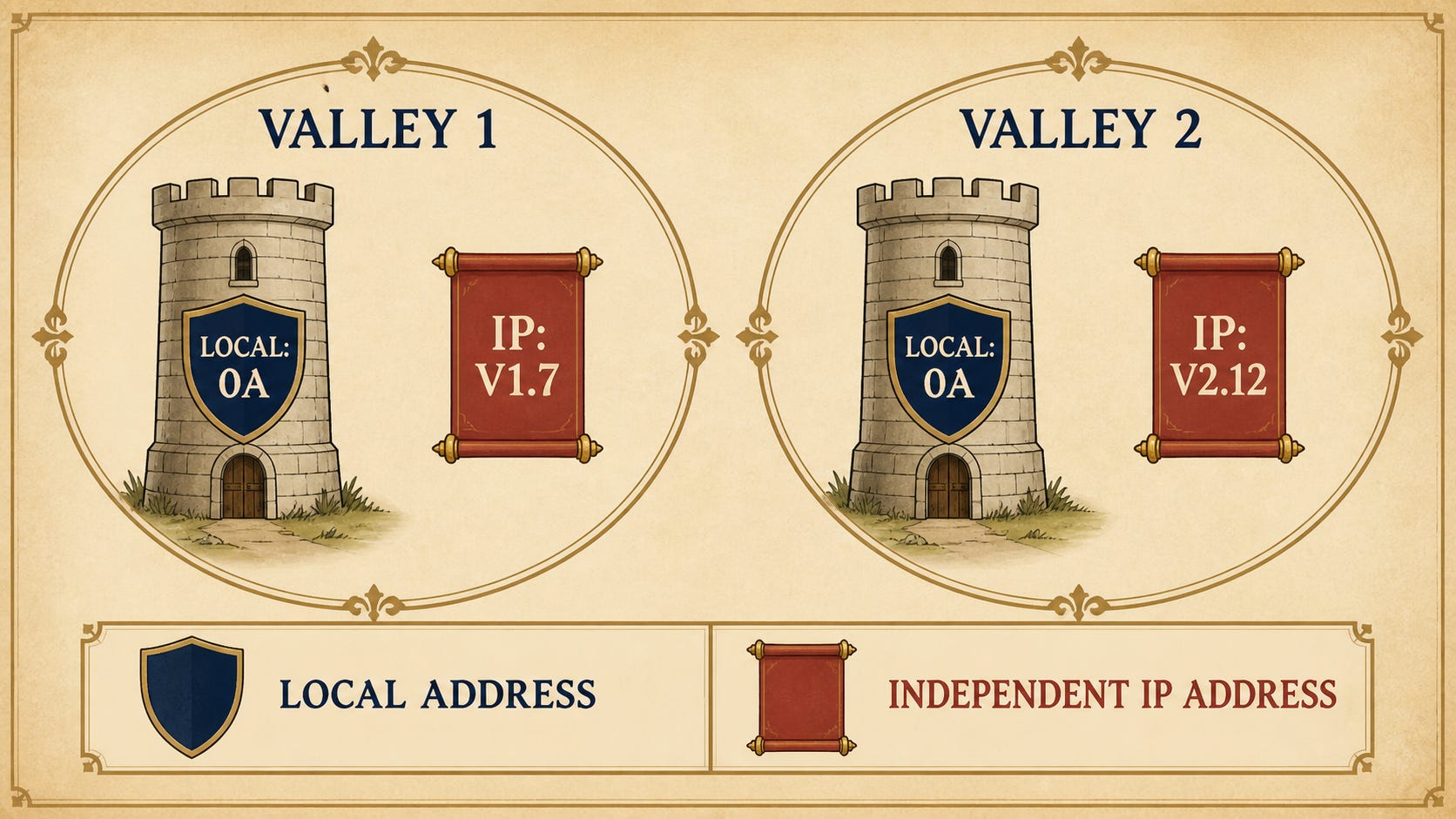
Figure 1. The local address 0A can be reused in both valleys. The independent wider addresses V1.7 and V2.12 identify the towers across the empire, and neither is derived from 0A.
We have just reconstructed the reason a machine can need both a MAC address and an IP address.
The MAC address is the local name. It identifies the immediate sender or receiver on one Ethernet network. The IP address is the wider name. It identifies the source and destination across many connected networks.
The two addresses do not compete, and one is not a more modern replacement for the other. They describe the same machine at different scopes, rather like a person’s room number and full postal address. A room number can be perfectly useful inside one building even though a letter crossing the country needs more information.
Is the destination still inside our valley?
Imagine that tower 0A in Valley 1 receives an order:
Deliver this message to
V1.12.
The destination begins with V1, and our tower also belongs to V1, so the destination is local. It can use exactly the machinery we built in Part 1. It discovers which local tower owns V1.12, learns that tower’s local address if necessary, and sends a frame through the valley.
Then another order arrives:
Deliver this message to
V2.12.
This time the wider address tells us something important before a single signal is sent. The destination belongs to Valley 2, while our tower belongs to Valley 1. None of the local towers can deliver a frame directly through the mountain.
Our medieval rule can still be very simple:
V1.*  local
everything else  beyond the valley
Modern networking calls the precise version of this boundary a network prefix, but we do not need the binary notation yet. For the moment, the important discovery is that an address must contain enough structure to tell us not only who the destination is, but also whether it belongs to our local world.
Once 0A knows that V2.12 is remote, it needs somewhere local to send the message.
A gateway at the edge of the valley
We build a special tower at the border of Valley 1. It can receive local frames from our valley, but it also has a road leading into another network. Let us call it G1.
Tower 0A now learns one additional rule:
If the final destination is outside Valley 1, give the packet to
G1.
This creates a situation that looks strange only until the two scopes become visible. Suppose 0A wants to reach V2.12. The final destination is still V2.12, but the next tower that can physically receive a local frame is G1.
The message therefore carries two destinations:
Final IP destination: V2.12
Local MAC destination: G1
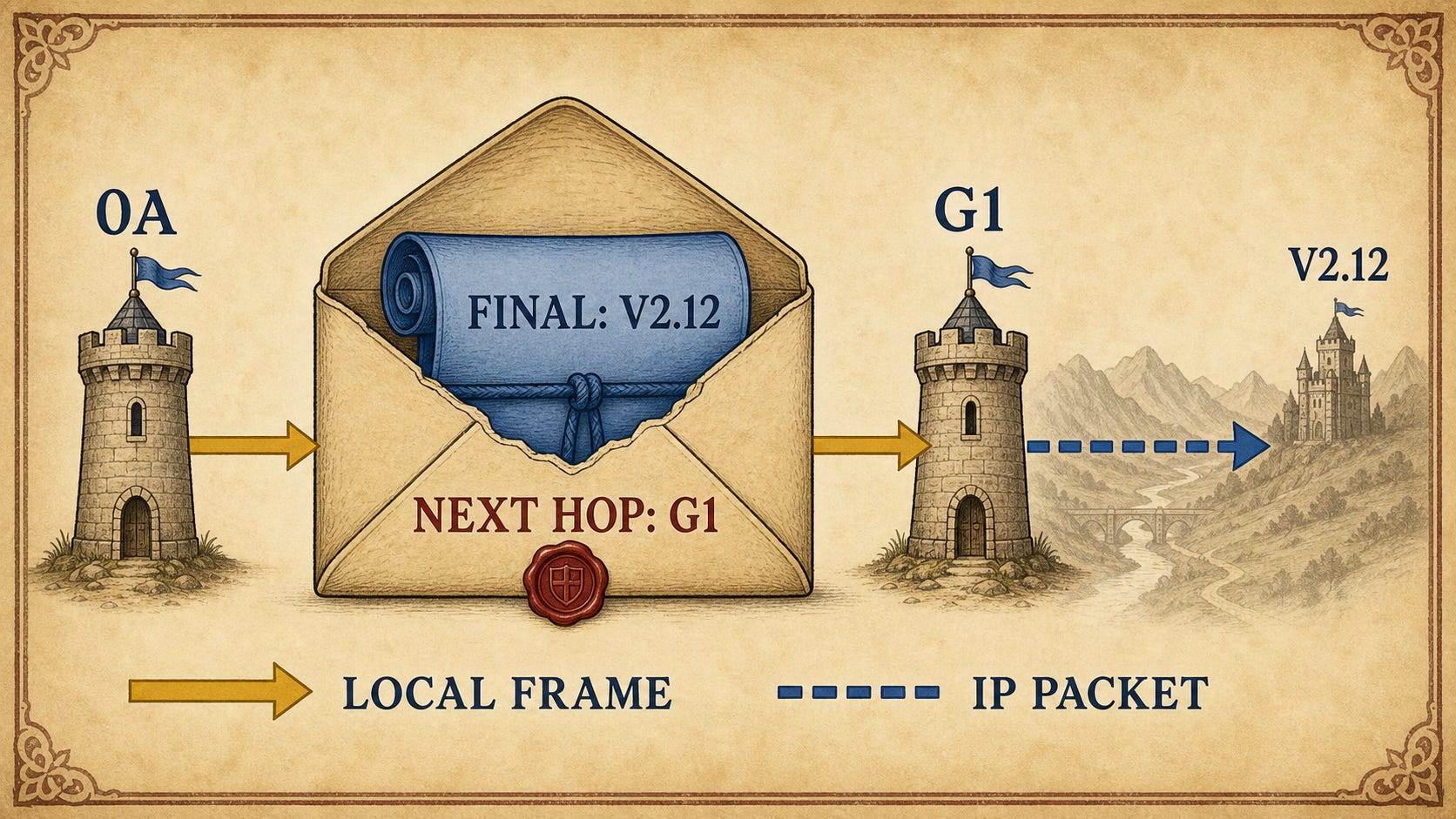
Figure 2. The local frame is an outer delivery envelope addressed to the next hop, G1. The packet inside keeps the final destination, V2.12.
The outer address gets the message across the current local network. The inner address survives beyond that network and tells every gateway where the journey should eventually end.
Gateway G1 receives the frame because its own local address is written on the outside. It removes that local envelope and reads the wider address inside:
Destination IP: V2.12
Now G1 faces the same question that tower 0A faced, only on a larger map. Where should this packet go next?
A small map inside every gateway
We hang a parchment inside G1:
Valley 1          directly connected
Valley 2          eastern relay R1
Valley 3          northern relay R2
Everything else  royal highway G0
This parchment is our routing table.
It does not describe the complete road from Valley 1 to every tower in the empire. G1 does not need to know every bridge, every mountain pass or every official who will lose the paperwork. It only needs to know the next useful step.
For V2.12, the table selects relay R1. If the link between G1 and R1 is another local Ethernet-like network, the wider address of the next hop is still not enough to send a frame. G1 needs the local address of R1 on that link.
This brings us back to the machinery from Part 1. If the mapping is not already known, G1 asks the local network which MAC address belongs to the next-hop IP address. In IPv4 over Ethernet, this is ARP.
The forwarding process is therefore not one mysterious act called routing. It is a sequence of smaller questions:
Where is the packet ultimately going?
        ↓
Which route best matches that destination?
        ↓
What is the next hop on that route?
        ↓
Which local address belongs to that next hop?
        ↓
Send one local frame
Routing chooses the direction. ARP, when the current link is IPv4 over Ethernet, supplies the local delivery address needed to take the next step.
The same packet, a new local frame
The route across our empire might look like this:
Tower 0A in Valley 1
        ↓
Gateway G1
        ↓
Eastern relay R1
        ↓
Gateway G2
        ↓
Tower 0B in Valley 2
On the first hop, the local frame is addressed to G1. After G1 opens that frame and chooses the next route, it creates a new local frame addressed to R1. Relay R1 repeats the process and creates another frame addressed to G2. Inside Valley 2, G2 finally creates a frame addressed to tower 0B.
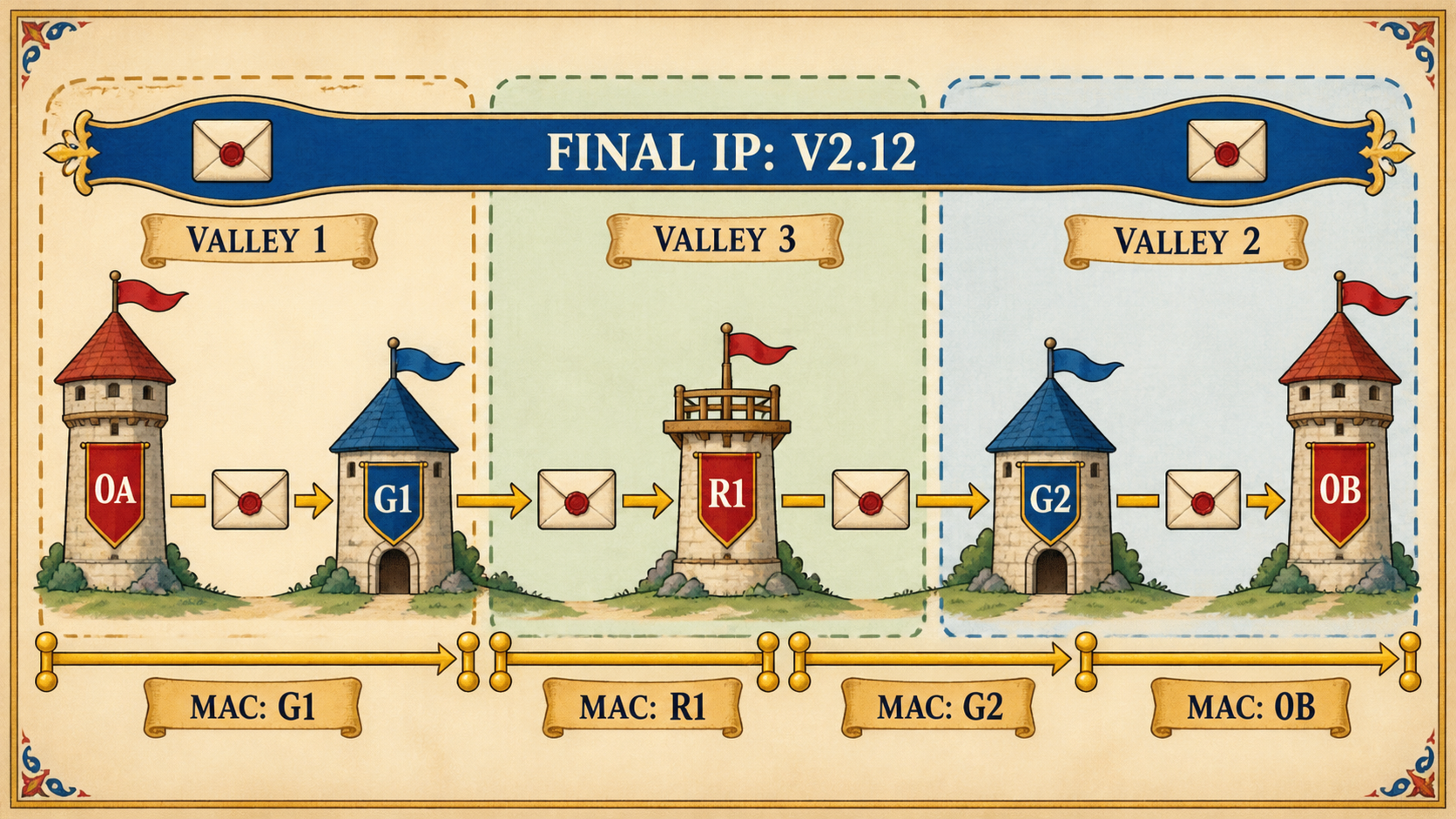
Figure 3. The blue end-to-end destination remains V2.12. Each gold local delivery ends at one next hop, after which a new local frame is created for the following link.
The IP destination does not become G1, then R1, then G2. It remains V2.12, because that is the end of the journey. What changes is the local delivery information wrapped around it.
This distinction gives us the mental model for the whole article:
The IP packet describes the end-to-end conversation. The local frame describes only the next delivery.
Every gateway repeats the same small procedure. It removes the local frame, reads the destination IP, consults its routing table, chooses a next hop, and creates whatever local frame the next link requires.
The routes also describe valleys rather than every individual tower. G1 does not need separate rules for V2.1, V2.2, V2.3 and every other address in Valley 2. One rule for V2.* is enough, because the next useful step is the same for all of them.
Our empire may eventually grow too large for routes to be written by hand. Routers can then exchange information and learn routes from one another, but that changes how the parchment is produced, not how a packet uses it. Forwarding still means reading the destination, selecting the best route and taking one local step.
We have now rebuilt the complete mechanism with towers. Local names move frames inside a valley. Wider addresses identify destinations across valleys. A boundary tells a tower whether the destination is local. A gateway accepts everything beyond that boundary. A routing table chooses the next hop, and each local network carries the packet one step farther.
Our little kingdom is no longer one network.
It is becoming a network of networks.
In other words, we have started building Layer 3.
Only now are we ready to leave the towers.
Back to the real world
Imagine one Linux machine connected to a home or office network:
IP address:      192.168.1.23/24
Interface:       eth0
Default gateway: 192.168.1.1
MAC address:     3c:52:82:xx:xx:xx
This is almost exactly what our tower knew. The machine has a local Ethernet identity, a wider IPv4 identity, a description of its local boundary, and the address of a gateway that can accept packets leaving that boundary.
Suppose an application wants to reach 192.168.1.50. Linux has a directly connected route for the local network, so the selected next hop is the destination itself. If the neighbor cache does not already contain the answer, ARP asks:
Who has
192.168.1.50?
Once the machine learns a mapping such as 192.168.1.50 → aa:bb:cc:dd:ee:ff, it can place the IP packet inside an Ethernet frame addressed directly to that MAC address.
Nothing particularly dramatic happened. We stayed inside one valley.
Leaving the valley
Now the same application wants to reach 8.8.8.8.
Linux exposes the relevant routes with ip route:
default via 192.168.1.1 dev eth0
192.168.1.0/24 dev eth0 scope link
At first this looks like the usual Linux habit of turning a simple idea into compressed hieroglyphics, but the table contains only two important rules. Destinations in 192.168.1.0/24 are directly reachable through eth0. Everything for which no more specific route exists goes through 192.168.1.1.
For 8.8.8.8, the local route does not match, so the default route selects 192.168.1.1 as the next hop. The packet remains addressed to 8.8.8.8, while the first Ethernet frame is addressed to the MAC address of 192.168.1.1.
If that MAC address is unknown, ARP asks:
Who has
192.168.1.1?
There is one technical correction worth making explicit here. It is common to explain the host as if it first performs a separate subnet test and then, only for a remote destination, remembers that routing tables exist. The operating system actually performs a route lookup. Configuring 192.168.1.23/24 on eth0 creates the directly connected route, while configuring the gateway creates the default route. Local and remote delivery are two outcomes of the same lookup.
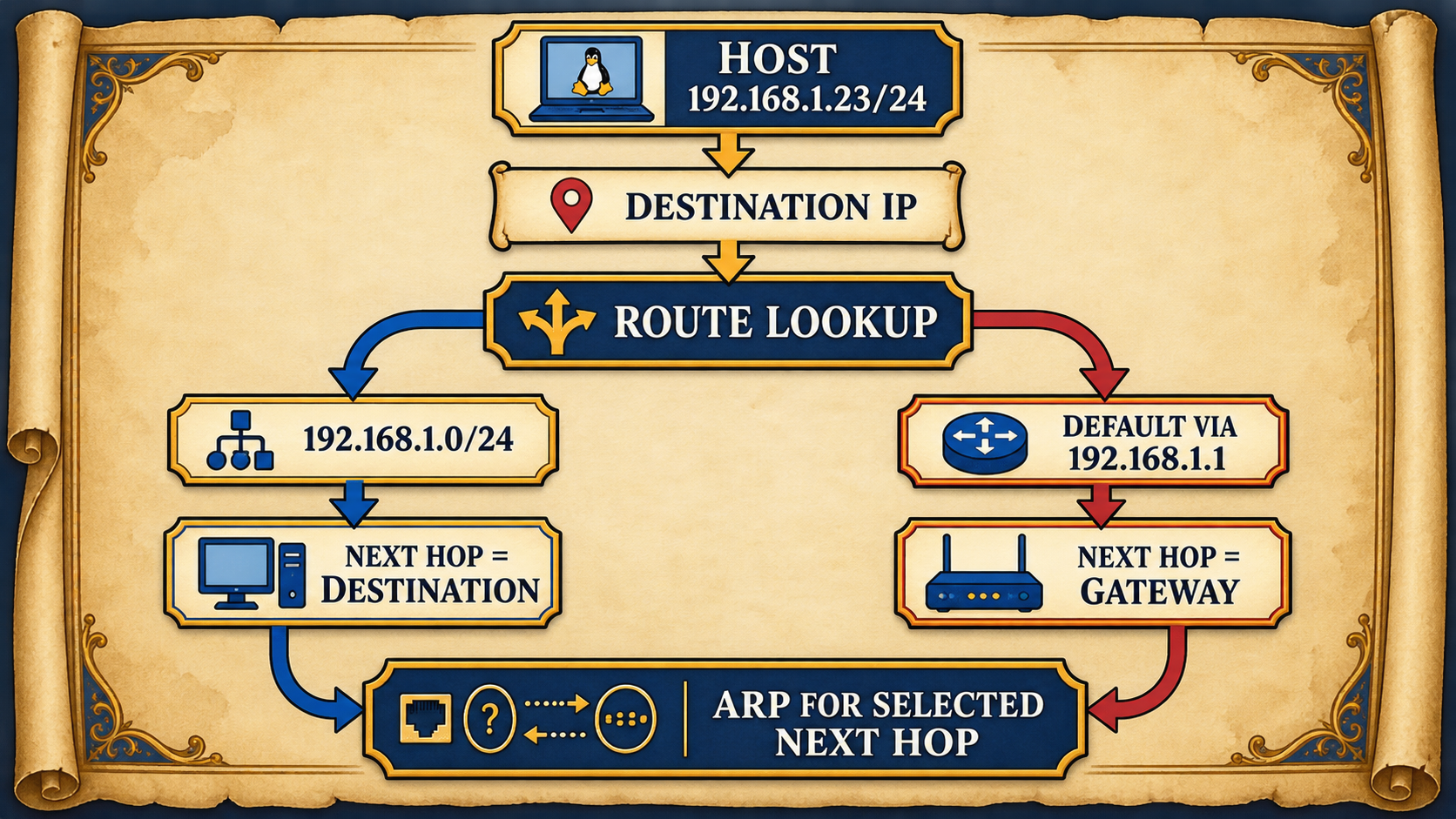
Figure 4. The route lookup happens first. It selects either the destination itself or the gateway as the next hop, and only then does ARP resolve that selected next hop on Ethernet.
This ordering prevents two common confusions. ARP does not decide whether a destination is local, and it does not choose a route. It answers a local address-resolution question after routing has already chosen the next hop.
Where does the valley end?
Our tower used a rule such as V1.* to recognize its valley. IPv4 represents the same idea with a network prefix.
An IPv4 address contains 32 bits, which we usually write as four decimal octets. In 192.168.1.23/24, the /24 says that the first 24 bits belong to the network portion and the remaining 8 belong to the host portion.
For this address, the network is 192.168.1.0/24. Addresses such as 192.168.1.5, 192.168.1.50 and 192.168.1.200 belong to that network, while 192.168.2.5 does not.
The traditional subnet mask 255.255.255.0 expresses the same boundary. In binary it contains 24 ones followed by 8 zeroes. The ones mark the network portion, while the zeroes leave room for host addresses.
The boundary does not have to respect the dots in the decimal notation, because the dots exist for us and the bits exist for the machine. Consider 192.168.1.10/26. The first 24 bits and the first 2 bits of the final octet belong to the network, leaving 6 host bits.
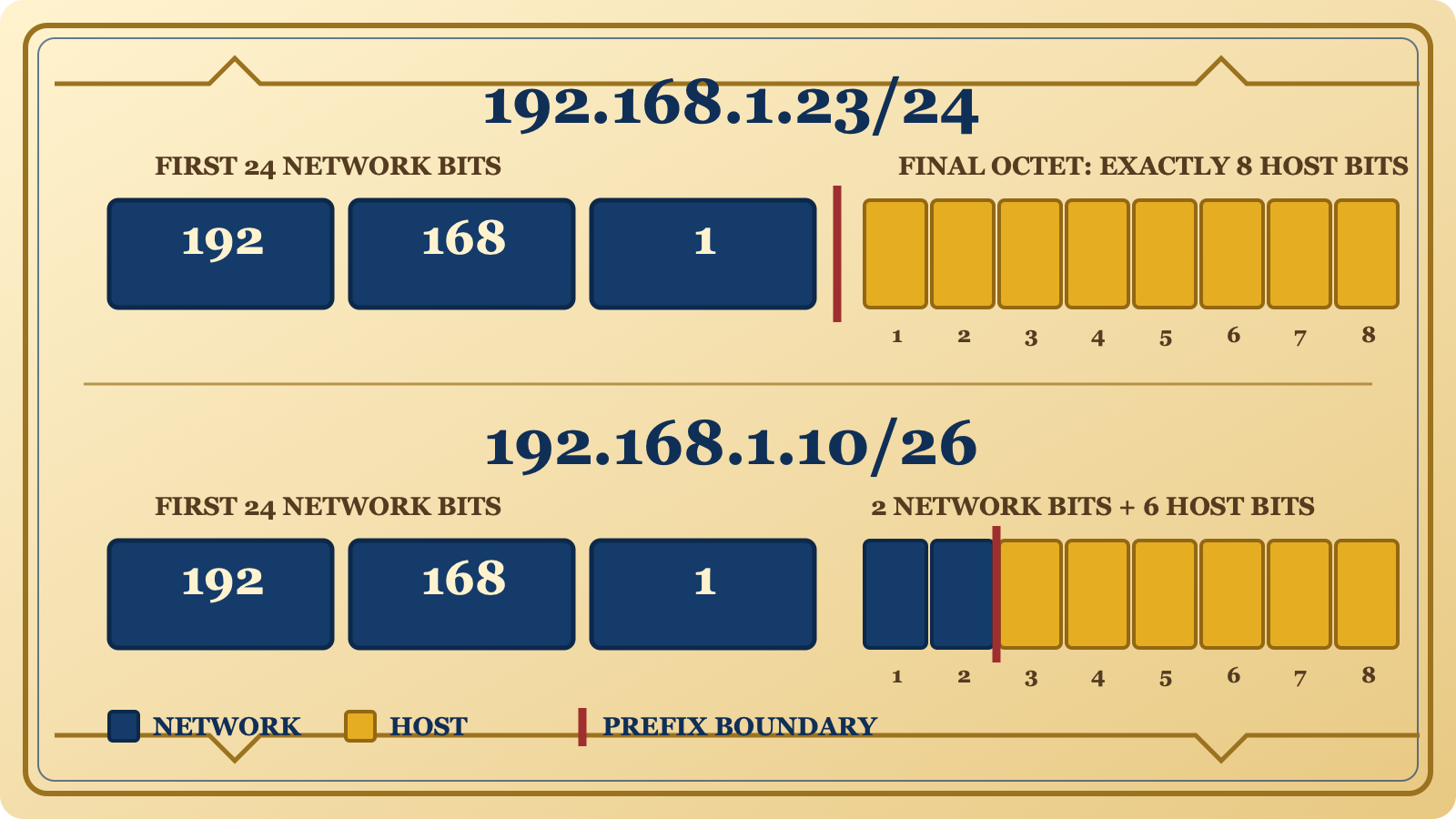
Figure 5. Each final octet contains exactly eight bit positions. A /24 leaves positions 1 through 8 for hosts, while a /26 uses positions 1 and 2 for the network and leaves positions 3 through 8, exactly six bits, for hosts.
Those four /26 networks begin at:
192.168.1.0/26
192.168.1.64/26
192.168.1.128/26
192.168.1.192/26
This is why 192.168.1.10 and 192.168.1.50 belong to the first /26, while 192.168.1.70 belongs to the second. The decimal addresses look almost like neighbors, but the prefix has placed a real border between them.
The prefix is not an intermediate technique unrelated to our story. It is the exact mathematical form of the question our first tower had to answer:
Does the destination belong to my local network, or must the selected route lead through a gateway?
Who gave the host its map?
So far our computer somehow knew its IP address, its prefix, its default gateway and usually a DNS server. On a normal home or office network, nobody sits down every morning and manually configures every laptop, phone, printer and coffee machine that has somehow acquired WiFi.
Most of the time, DHCP does the paperwork.
A new host already has its local Ethernet identity, but it does not yet know its IPv4 address, its network boundary or its default gateway. It cannot send a normal IP request to a server whose address it does not know from an address it does not have, so it begins with a local broadcast:
I am here. Can somebody tell me who I am supposed to be?
The basic exchange is usually remembered as DORA: Discover, Offer, Request and Acknowledgement. The server may eventually give the client:
IP address:      192.168.1.23
Prefix:          /24
Default gateway: 192.168.1.1
DNS server:      192.168.1.1
Lease:           24 hours
DHCP did not route anything. It simply handed the host the small piece of the map it needs before routing can begin.
The lease means that the address is borrowed rather than carved into stone. Before the lease expires, the client normally tries to renew it, and the server may allow the same address to remain or assign another one.
The first DHCP discovery is a local broadcast, and routers normally do not forward local broadcasts. When the DHCP server lives in another network, a DHCP relay listens locally and carries the request toward the remote server. This lets one server configure many networks without joining their broadcast domains together.
If DHCP is absent, nothing fundamental breaks. We can configure the IP address, prefix, gateway and DNS server manually, provided that the values are correct and the chosen address does not conflict with another host.
Small networks often place DHCP, routing, NAT, firewalling, DNS forwarding and WiFi inside the same plastic box near the wall. Calling that entire creature a router is convenient but slightly misleading. Router is one role performed by the device, just as a castle can be a home, a fortress, a court, a prison and a very expensive heating problem at the same time.
Following one real packet
Host A lives at 192.168.1.23/24, and somewhere beyond several networks Host Z lives at 10.20.0.42/16. Host A’s route lookup selects 192.168.1.1 as the gateway, and ARP gives it the gateway interface’s MAC address.
The word interface matters here. A router connects at least two networks, so it does not have one universal IP address or one universal MAC address. Each Ethernet interface belongs to a particular local network and has its own MAC address, while it will usually have an IP address in that network as well.
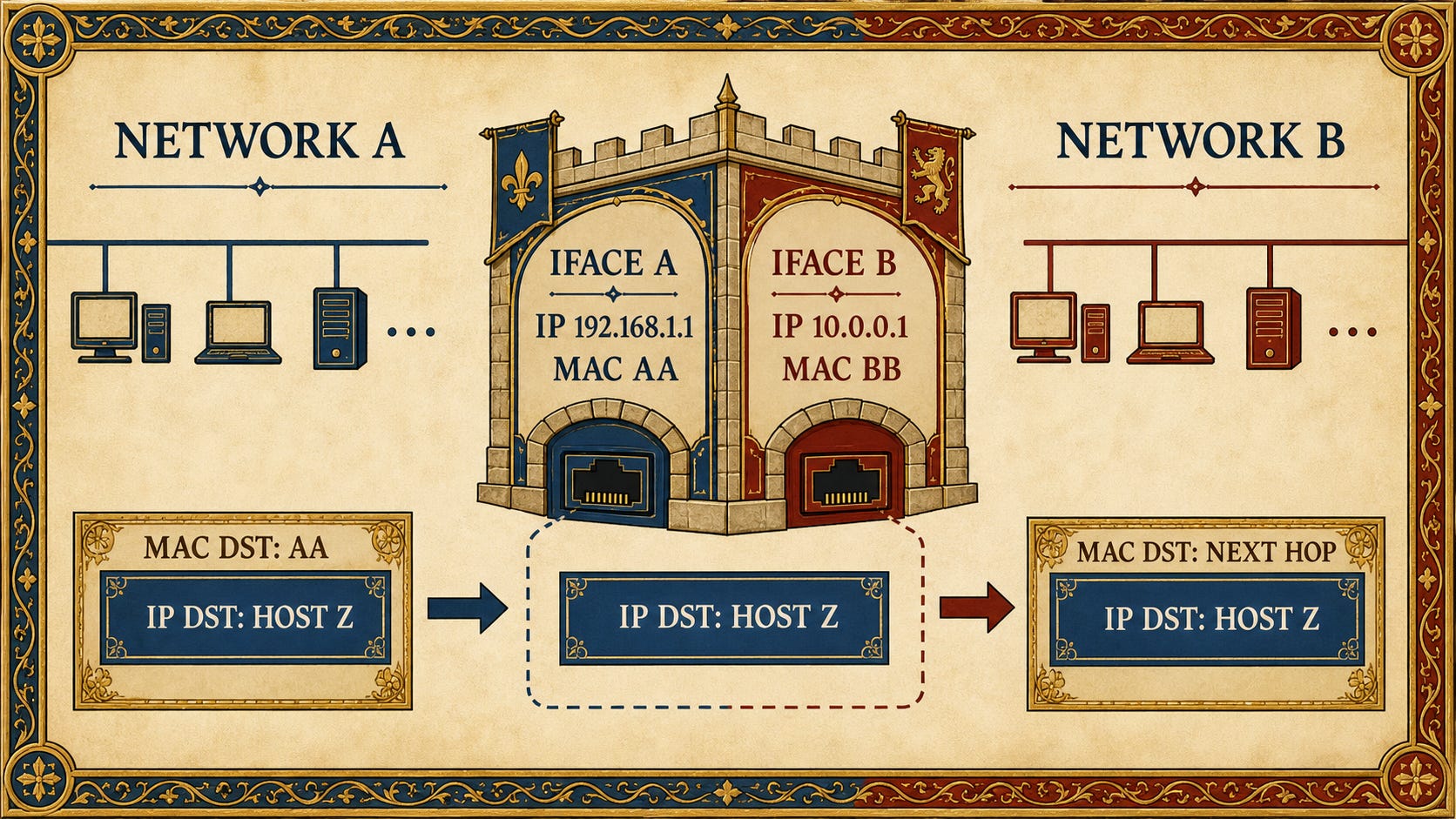
Figure 6. A router’s interfaces belong to different local networks. The incoming frame ends at Interface A, while a new local frame leaves through Interface B with that interface’s identity.
Hosts on 192.168.1.0/24 use 192.168.1.1 as their gateway because that address belongs to the router interface standing inside their own network. The interface on the other side belongs to another network and has different local neighbors.
Host A creates the first frame:
Ethernet destination: MAC of 192.168.1.1
IPv4 destination:     10.20.0.42
The router removes the Ethernet frame, reads the IPv4 destination, performs its own route lookup and chooses the next hop. If the outgoing link is also Ethernet, the router resolves that next hop’s MAC address and creates a completely new frame. The next router repeats the same process.
Eventually a router finds that 10.20.0.0/16 is directly connected. On the final Ethernet network, it uses ARP to learn Host Z’s MAC address and creates the last local frame.
The IPv4 source and destination normally remain the same in this simple routed topology. NAT can deliberately rewrite addresses, but NAT is another official with another stamp and is not required to explain routing.
The packet is not completely untouched, however. Every router decreases the IPv4 Time to Live, usually called TTL, by at least one. Because TTL is part of the IPv4 header, the router also updates the IPv4 header checksum.
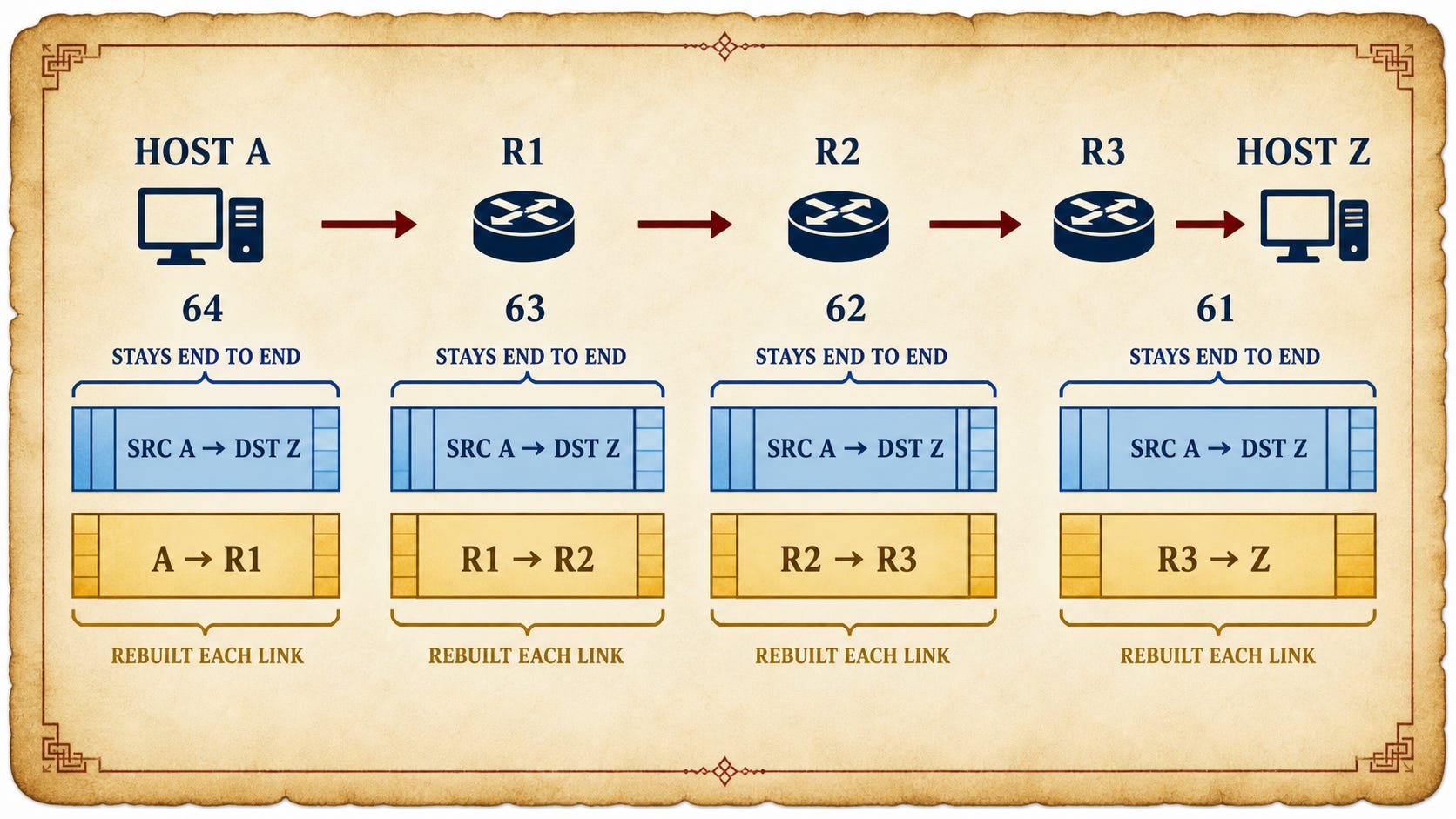
Figure 7. The IPv4 source and destination stay end to end, each local frame is rebuilt for one link, and TTL decreases as routers forward the packet.
TTL exists because routing information can be wrong. If two routers keep sending a packet back and forth, the packet must not wander between them until the end of history. When TTL reaches zero, the router discards it and normally sends an ICMP Time Exceeded message back toward the source.
Ethernet is not mandatory on every link. Another link technology may use different framing and may have no MAC addresses or ARP at all. What survives is the larger mechanism: the router removes the old link-layer envelope, keeps the IP destination, chooses the next route and creates whatever local delivery the outgoing link requires.
Layer 3 does not bypass Layer 2. It uses one local link, then another one, then another one. A global network is made from local networks that repeatedly agree to pass the packet on.
Routers do not know the whole journey
A router does not normally calculate the complete road from Host A to Host Z. It needs to answer only one question:
Where should I send this packet next?
This is why routing tables usually describe networks rather than every individual host. One rule can say that the whole 10.20.0.0/16 network is reachable through Router B.
Sometimes several routes match the same destination:
10.0.0.0/8       via Router A
10.20.0.0/16     via Router B
10.20.5.0/24     via Router C
default          via Router D
The address 10.20.5.17 matches every line, including the default, but the /24 route wins because it has the longest matching prefix. A longer prefix describes a smaller and more specific group of addresses. The default route has a prefix length of zero, so it is the vaguest possible instruction: if nobody knows better, send the packet this way.
For a small network, somebody can configure these routes by hand. In a much larger system, routers can exchange routes through protocols such as OSPF, IS-IS and BGP. Those protocols deserve their own story, but forwarding remains the same after the table has been built: read the destination IP, choose the most specific matching route, select the next hop, and perform one local delivery.
What actually happens when we type ping
When we run:
ping 8.8.8.8
the operating system performs the route lookup, selects the next hop, resolves the necessary local address if the outgoing link requires it, and sends an IPv4 packet containing an ICMP Echo Request.
If the remote host chooses to answer, it sends an ICMP Echo Reply back toward us. A successful reply means that the forward route worked, the return route worked, the necessary local deliveries succeeded, and the policies along the way allowed ICMP.
A failed ping therefore does not prove that the destination is dead. It proves only that the complete conversation did not return, which is a much less satisfying answer and a much more honest one.
The mental model to keep
We began with a local network that knew only local tower names. The second valley made those names ambiguous, so we added a wider address that named both the valley and the tower. Once a destination could be remote, we needed a boundary that distinguished our local world from everything beyond it. A remote packet needed a gateway, and the gateway needed a routing table that selected the next useful step.
Every new idea appeared because the growing system made the previous model insufficient.
The result can be carried in one sentence:
Routing keeps an end-to-end IP destination inside the packet while rebuilding the local delivery around it for every link.
A MAC address answers who should receive this frame here. An IP address answers where the packet is ultimately going. A prefix describes which addresses belong to a network. A route chooses the next hop, and ARP maps that next-hop IP address to a local Ethernet address when the current link needs one.
None of this replaced the network from Part 1. We built above it and then reused it at every hop.
Put those answers together and our valleys become a network of networks, which is rather inconveniently the same direction in which our rulers were taking their empire anyway.
One machine is still a black box
There is one character in this story that we have treated with suspicious casualness: the computer itself.
Throughout both parts I have written that the computer checks a route, stores a neighbor, owns a MAC address and sends a frame, but what inside the machine actually does those things? Where does a network interface begin and the operating system end? What changes when one computer has several interfaces, and what happens when some of those interfaces are not physical at all?
Linux can create virtual interfaces, connect them with virtual Ethernet pairs, place them in bridges, and split the network into namespaces that behave like separate hosts. One physical machine can contain several isolated valleys and the roads between them.
Which means that, instead of invading another kingdom for the next experiment, we can build almost the entire empire inside one Linux machine.
That is where we go next.
Series Hub:
Networking in the Power Grid for Software Developers

I have worked with networked software for years, but for most of that time the network was something I used rather than something I really understood. I could open a socket, call an API, connect to an IP address, and continue with the part of the system I was responsible for.